Glossary
This Glossary page explains some specific terminology used in Update Factory.
Target Type
A Target Type is a category that can be applied to a target. One only category can be applied to a target, implying targets are partitioned based on their Target Type. Target Types are used to define the compatibility of targets with Distribution types.
Distributions and Software Modules Locking
Locking is a mechanism that makes Distributions and their associated Software Modules immutable, preventing any modification to their contents once they have been assigned to targets.
A Distribution and its Software Modules are locked automatically the first time the Distribution is assigned to a target — whether through a manual assignment, an automatic assignment rule, or a rollout. Once locked, no Software Modules can be added to or removed from the Distribution, and no artifacts can be added to or removed from its Software Modules.
The primary goal of locking is to ensure consistency and predictable behaviour across all devices involved in an update. Without locking, modifying a Distribution mid-rollout could lead to different devices receiving different sets of artifacts — for example, some targets could install three artifacts while others install five, resulting in an inconsistent fleet state that is difficult to diagnose and remediate.
Locking treats Distributions and Software Modules as static, immutable entities: once prepared and finalised, they represent a known and stable update payload. The recommended workflow is:
- Create an empty Distribution and its Software Modules.
- Add the required Software Modules and artifacts.
- Assign the Distribution to targets — locking is applied automatically at this point.
Note
If you need to iterate on a Distribution during testing, the recommended approach is to create new versioned distributions (e.g. 1.6-beta1, 1.6-beta2) rather than attempting to modify an already-locked one.
To ensure consistency, a locked Distribution cannot be unlocked from the UI. If changes are required after locking, a new Distribution must be created.
Required Migration Step
Required Migration Step is a property of a distribution that, when enabled, forbids the cancellation of the distribution when another distribution is later applied to the same target device.
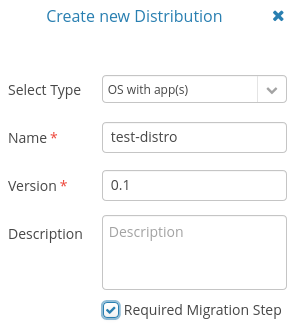
Figure 1
A distribution can be created with Required Migration Step property by selecting the dedicated checkbox, as illustrated in Figure 1.
The property can be edited only if the distribution has never been applied to any device, otherwise a new distribution should be created.
Note
The Required Migration Step property is forced to disabled if the multi-assignment feature is enabled in the System Config view.
